Posts

Python Programming (Deep Learning with Python)

Image
When you are in a modern age and are interested in learning different algorithms and programming languages, getting to know Python Programming is necessary.  You can not only learn exciting programming but also add it to your skills for future occupations. That's the reason for learning it appropriately is all you need. But you should research and know what the authentic websites are that properly teach the program, especially when you are planning to learn online. And if that is the case, you need to know all about it that we are going to show you. Let's get in!  Course Introduction  Python Programming is a software development process. A lot of people around the world are learning Python programming. Python is a high-level language that is also a general-purpose programming language. If we talk about the invention history, then you should know that Guido van Rossom creates it. And it was first launched in 1991. The function of it is a block of codes that respond when it...

How to speed up internet by CMD in windows 10

Image
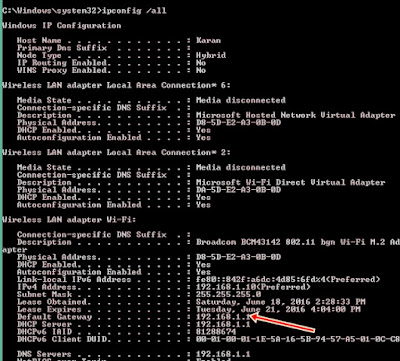
Though the internet is most important part of our day to day life. Without internet today's life is like thousands decade left. With net its important to have high speed net also. Today I talk about how to speed up slow net. We use CMD option in windows 10 to boost up internet speed. First of all in your windows PC click on Start and Type “cmd” in Search program and files box (right click and select Run as Administrator). Now command prompt will appear and in command prompt go to root directly “C:\” by typing “cd C:\ ” . Step-1: First of all we have to check our internet speed from the default way that your PC had currently connected to and for that firstly you need to find the default gateway address and then checking the connection speed at that IP address. # Let's find the default gateway by entering the command ipconfig /all in the command prompt. And there note down the default gateway address. Step-2: When your device has connected to the internet connec...

How to cut copy and paste files on Mac

Image
We think Mac & Windows behavior is same but it's not. There are few things that is similar with Windows but not everything. So you can't do cut and paste on Mac as like Windows. Windows is one the most popular operating system in the desktop world. Because Windows takes control 82% of desktop, Mac takes control 13% of computers and rest of the 5% is shared on others operating system. So, now you are thinking that windows are better than Mac. No, don't think like that. Mac  is more smooth & faster than Windows . How to copy and paste on Mac If you want to copy and paste on Mac, then you can do it easily with keyboard shortcut via pressing Command + C . You can also do it via mouse. Select a file or folder or text then take the cursor to the Edit (Which is placed at top left corner) click on it then you will see their cut, copy and paste text. Just click one of them then you will see the action. After select you may also right click on mouse then...

Make your linux terminal more beautiful

Image
Everyone wants to make him/her self more unique and more beautiful. If you are using linux then you are one of the unique operating system. In linux, most important thing is terminal. Now, this is your first priority that make your linux terminal more beautiful. Make your linux terminal more beautiful In linux there are most of the commands you need to execute in terminal. So I think we need to make more beautiful our linux terminal.  Don't need to make it more complex. Making My Terminal More Stylish Lets make our linux terminal more beautiful.  Open you linux terminal. And type this command. It will take few minutes to download. Actually it depends on you internet connection. $ sudo apt-get install cowsay If you are any other directory in linux terminal then you need to move to home directory via linux terminal, so you need to execute this command. $ cd .. if you know what I meant then you can go easily in the home directory via this command. But this is ...

How To Install Latest Nodejs and React js on CentOS/RHEL 7/6

Image
Today I'm going To show how to install How To Install Latest Nodejs and React js  on CentOS/RHEL 7/6. Step 1 – Add Node.js Yum Repository: First of all, You Have to enable node.js yum repository in your system provided by the Node.js official website. You alsoneed Devevelopment tools to build native add-ons to be installed on your system. Open Your Teminal And Run Those Command: #yum install -y gcc-c++ make  #curl -sL https://rpm.nodesource.com/setup_11.x | sudo -E bash -  Step 2 – Install Node.js and NPM  After adding yum repository install Node.js #yum install nodejs Step 3 – Check Node.js and NPM Version #node -v  Also Check NPM version  #npm -v  After Install Js Lets install React Js On Redhat Linux Step:1 #npm install -g create-react-app   Step 2 : Make React  Linux-skill #create-react-app Linux-skill     # cd linux-skill #Npm start   Thank You For visiting my Blog. Stay b...

How to Install apache server In Red Hat 7 / Centos 7

Image
You want to get a server in your linux environment. Then you are in the right place.  Run Command as root Run those command as root user. Because without root user your command won't be execute. As we can say without seeds a tree can grow up. Same as like linux root user. Without root user we can't execute linux command. You may say what I am saying is not right. But, there are some directories those are not accessible without root user. We can give permission to our current username. But that will be a security issue. That's not good for linux. And you must need know that linux root user password must be different from your local user. If anyone access in your system as root user. Your all data can be hacked by him/her. So be careful about that. For Installing Apache Server Open your terminal. And type those commands.  #yum install -y httpd After install to run http service you have to run this command. #systemctl start httpd.service To che...

How to Install Python Redhat 7 / CentOS 7

Image
If you are new to programming then python is the best for learning programming lang. Because this is easy and free to learn. Today's modern technology need this language.  What can you do through python?  Web Application Development Scientific and Numeric Computing  GUI Programming Software Prototyping etc.  Search on Google you will get lots more thing about python. Facilities of Python Learner's If you really want to learn python then you will get lot of tutorial out there.  Google also started python class.   Here is another educational source TechBeamers for python learner's .  Now let's learn how to install Python in Redhat 7 & CentOS 7.  Run those command on your terminal step by step: #yum -y update #yum -y install yum-utils #yum -y groupinstall development   #yum -y install https://centos7.iuscommunity.org/ius-release.rpm # yum -y install python36u # python3.6 -V  After installi...